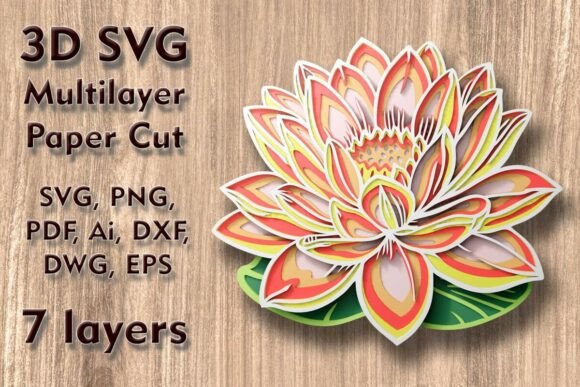
Lotus 3D SVG Multilayer PaperCut Files: Create Stunning 3D Wall Art with Precision
If you're looking to elevate your crafting projects with intricate, eye-catching designs, the Lotus 3D SVG Multilayer PaperCut Files could be the perfect addition to your creative toolkit. This versatile design is ideal for creating multilayer 3D wall art, shadow boxes, and decorative pieces that add depth and elegance to any space. Whether you're a seasoned crafter or just starting out, understanding how to use these files effectively can make a big difference in your final results.
What Are Lotus 3D SVG Multilayer PaperCut Files?
The Lotus 3D SVG Multilayer PaperCut Files are a set of digital design files that allow you to create detailed, layered paper or wood cutouts using cutting machines like Cricut, Silhouette, laser cutters, or CNC routers. The design features seven distinct layers, each contributing to the overall 3D effect when assembled. The file size is 250 mm wide by 220 mm high (9.85 x 8.7 inches), making it suitable for a variety of projects. While the size can be scaled up easily, it's important to note that reducing the design may cause thin elements to become too delicate or lose detail.
Common Mistakes When Using These Files
One of the most common mistakes users make is not considering the implications of resizing the design. While increasing the size is generally safe, decreasing it can lead to issues with fine details, especially if the original design has intricate patterns. Thin lines or small shapes might disappear or become uncut, resulting in an incomplete or unsatisfactory final product.
Another frequent oversight is not checking the compatibility of the file formats provided. The download includes SVG, layered SVG, DXF, DWG, EPS, AI, PNG, and PDF files, but not all software supports every format. For example, if you're using a basic cutting machine, you may need to work with SVG or PNG files rather than more complex formats like AI or EPS. Always verify which file types your machine or software can handle before proceeding.
Why Material Choice Matters
The Lotus 3D SVG Multilayer PaperCut Files are compatible with a wide range of materials, including plywood, paper, cardstock, MDF, wood, acrylic, cardboard, and aluminum. However, the choice of material significantly affects the outcome. For instance, using thin cardstock may result in a less durable piece compared to thicker materials like MDF or plywood. On the other hand, materials like acrylic or metal may require different cutting settings or tools, so it's essential to adjust your approach accordingly.
Practical Tips for Better Results
To avoid common pitfalls, start by thoroughly reviewing the file specifications and instructions provided with the download. Make sure you understand the recommended material thicknesses and cutting settings for your specific machine. If you're unsure, test the design on a smaller scale or with a scrap piece of material before committing to a full project.
When working with layered designs, take the time to organize and label each layer properly. This not only makes assembly easier but also helps prevent confusion during the cutting process. Some users have reported difficulties when layers are mixed up, leading to misalignment and a less polished final look.
How to Choose the Right File for Your Project
Before purchasing or downloading the Lotus 3D SVG Multilayer PaperCut Files, consider the type of project you want to create. Are you planning to make a wall hanging, a shadow box, or a gift? Different applications may require slight adjustments to the design or additional elements like backing boards or lighting. Understanding your end goal will help you decide whether this particular file is the best fit for your needs.
Also, think about your skill level and available tools. If you're new to SVG cutting, choose a file that comes with clear instructions and support. Many creators offer tutorials or community forums where you can ask questions and get advice from others who have used the same files.
Maximizing the Value of Your Purchase
Once you've downloaded the file, take advantage of all the included formats. For example, if you're using a laser cutter, the DXF or DWG files may provide more precision than an SVG. If you're working with a Cricut or Silhouette machine, the layered SVG files can help you manage each section of the design more efficiently. Experimenting with different formats can help you find the one that works best for your setup.
Finally, don't hesitate to reach out to the seller or designer if you have questions. Many creators are happy to provide guidance or troubleshooting tips, especially if you're using their files for the first time. A little extra support can go a long way in ensuring your project turns out exactly as intended.